1. How a match goes
- Press Match at the top
- On the match card, choose who throws for each team and press Start
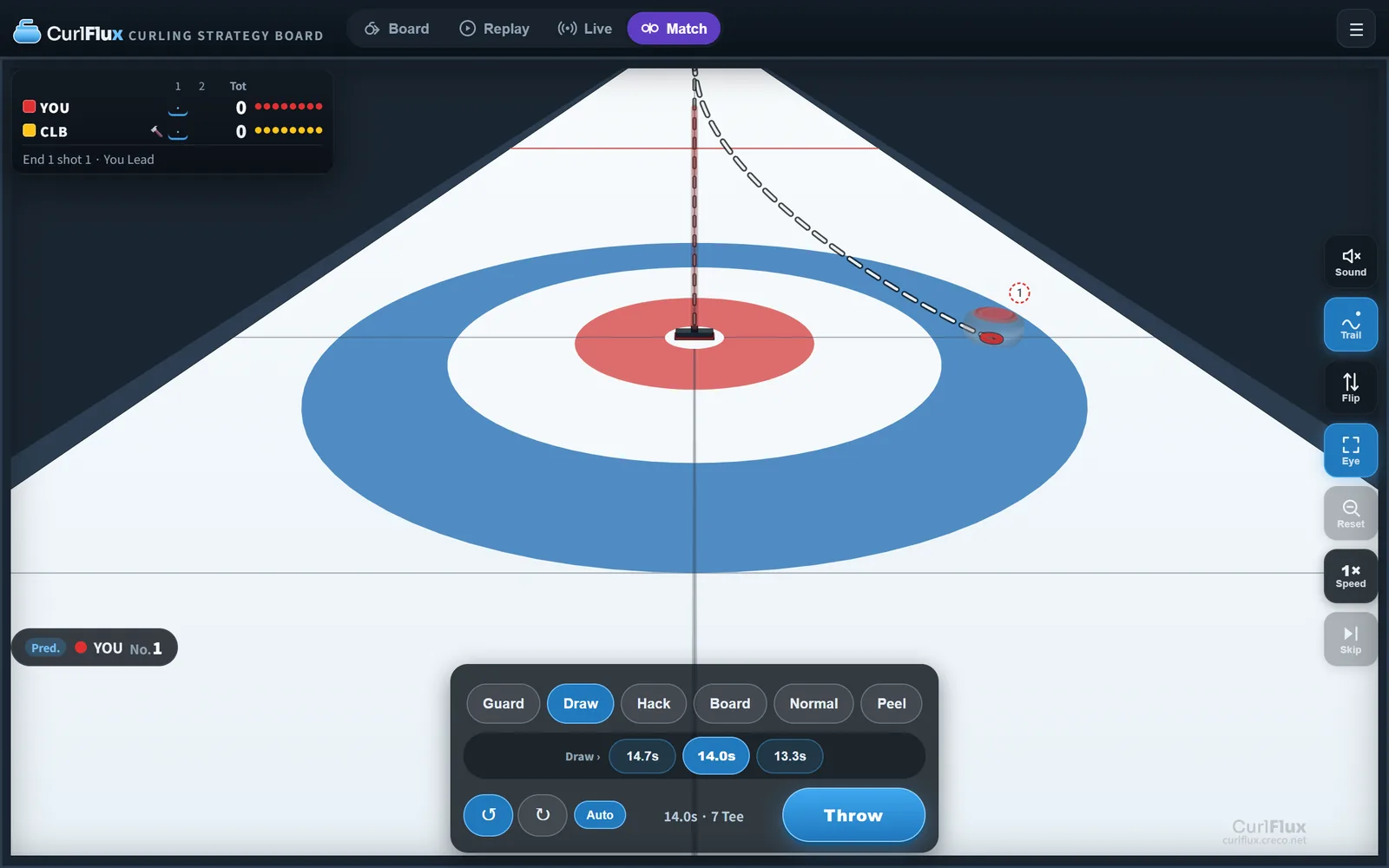
- Your turn: set the broom (aim), the weight and the turn, then press Throw
- Once the stone is running, press a sweep call to carry it further or bend it more. Use Skip sweeps on the opponent's stones
- After 16 stones the end closes itself and the counting animation shows the score
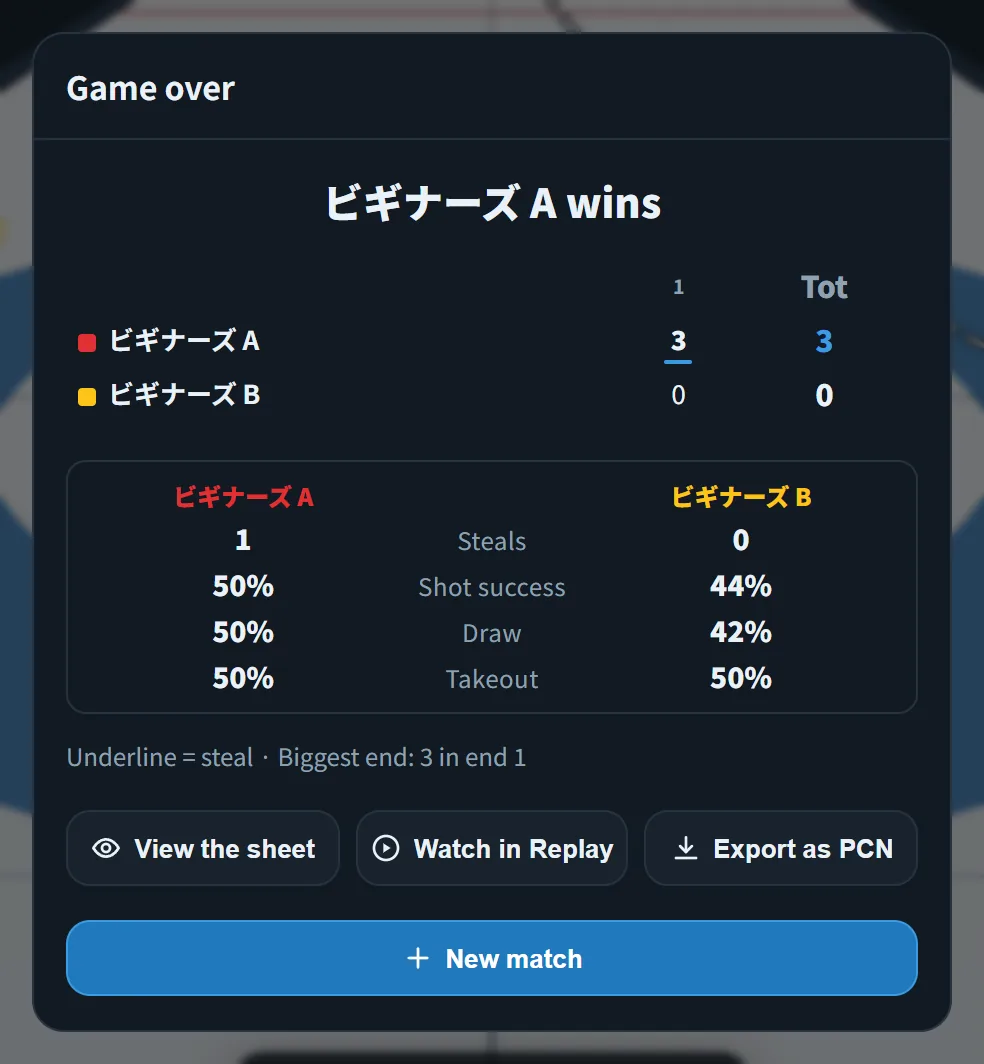
- After the last end you get the result (winner, line score, shot percentages). New match starts again
The view starts as the skip's view (looking back from behind the house). Switch views with ⌨ V.
The first time it is your turn, a tutorial (Weight → Aim → Throw → Sweep callouts) walks you through. It moves on as you act; close it with ✕ and it stays closed. To see it again, press “Show the tutorial again” in the Match tab of the menu.
2. Starting a match (the match card)
Entering Match shows the match card. Press a team name to choose who throws for that team.
| Choice | What it means |
|---|---|
| You | A person throws. Set both teams to You for a two-player match on one device |
| Beginner | Just started. Misses big and picks shots without looking at the score or the end |
| Club | Plays a few times a week. Sweeps only as much as needed |
| National | National-championship level. Also uses line calls (straight / curl) |
| Elite | World-championship and Olympic level. Reads the break point before sweeping |
Set both teams to the computer to watch (Club vs Elite works too).
Details lets you change each part of a level. Touching them marks that side as "custom".
- Human side: Delivery accuracy, Sweep power, Communication (how precisely the skip's call gets through)
- Computer side: Delivery accuracy, Sweep power, Shot choice, Sweep calls
Higher levels throw closer to the call and carry the stone further when sweeping. Better communication gives finer weight choices.
Below the card, pick the number of ends, the hammer (which colour has last stone in end 1) and the shot clock, then Start.
Once the match has started these cannot be changed. Use New match in the Match tab of the menu.
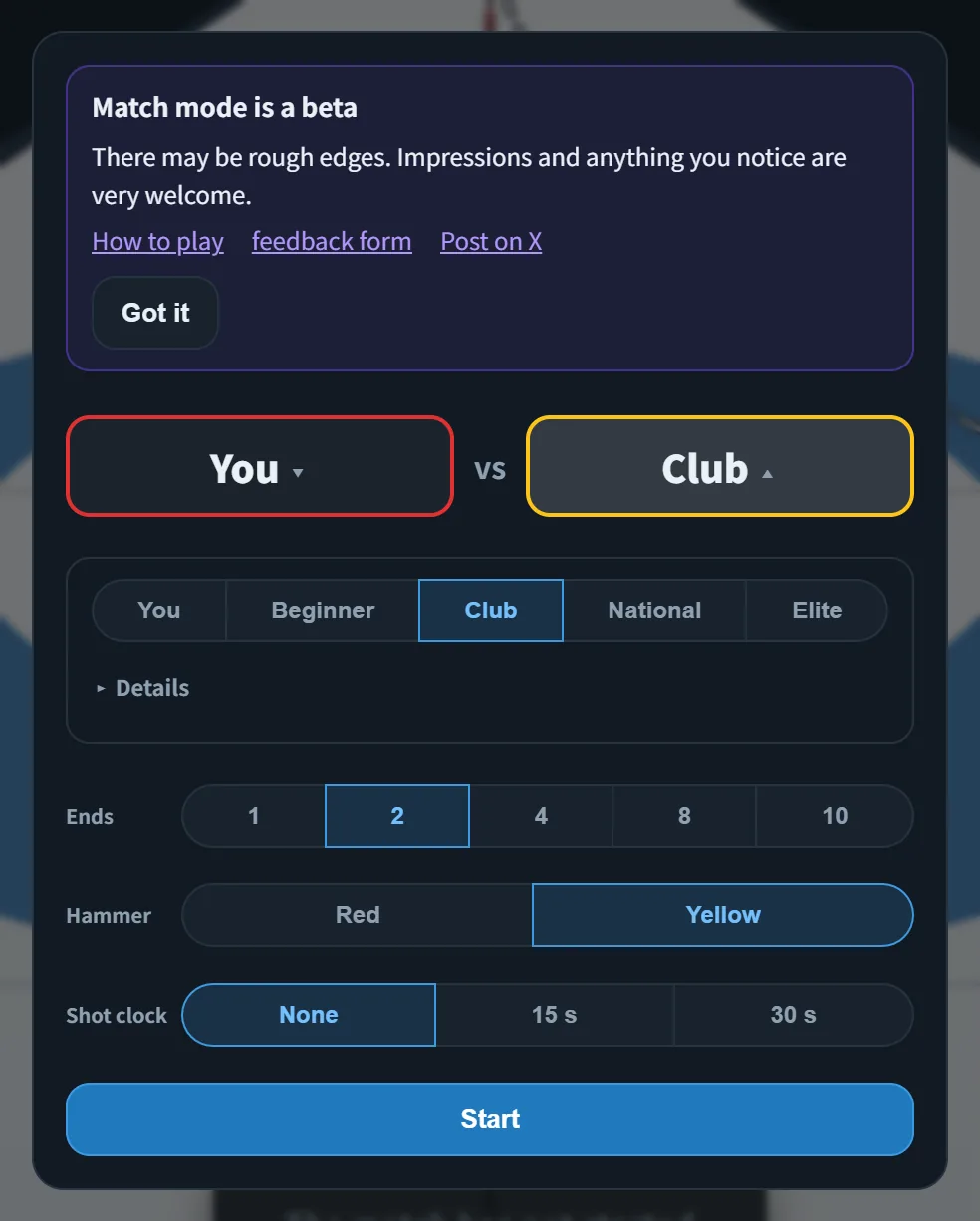
Press outside the card (or Esc) to close it without starting; you can then move to Board or Replay. To start, press Start the match in the control panel to bring the card back.
3. Throwing
On your turn the panel under the sheet shows the throwing controls (on the opponent's turn it says "X to throw" and nothing can be pressed).
3-1. Weight
- Press a tier: Guard / Draw / Hack / Board / Normal / Peel ⌨ 1–6
- Under the tier, the seconds (hog-to-hog time) around it are listed. Better communication gives finer choices
- The text on the right, such as "14.0 s · Tee", is the current read: hog-to-hog time and where the stone stops without sweeping
3-2. Aim (broom) and turn
- Drag the broom on the ice. It works in the skip's view too ⌨ arrow keys
- The turn is a two-way choice: ↺ (counter-clockwise) or ↻ (clockwise) ⌨ Q / E. With Auto on, the turn flips to curl into the centre when the broom crosses the centre line. Switch it off when you want the other turn on purpose
- A double tap sets the whole shot: tap the ice to draw to that spot, tap a stone to hit it with normal weight. Broom, weight and turn are set at once; with weaker communication, the weight is rounded to the nearest one your team understands
3-3. Throw
Press Throw ⌨ Enter. Every throw has your team's error on it. Stones usually come out a little light, and sweeping is meant to carry them the rest of the way, just like a real team.
Things you may see before throwing (they depend on the assist level, §6):
- Prediction line: the path and result if the shot goes exactly as called
- Ideal spot (thick ring; only at levels that show the prediction line): where the stone stops if thrown as called and not swept. Watch how the running stone drifts from it
- No.1 markers: the ranking of stones in the house
4. Sweeping
When the stone crosses the near hog line, the panel switches to sweep calls.
| Button | Effect | ⌨ |
|---|---|---|
| Whoa | Brooms up right now | 1 |
| Straighten | Sweep the curling side to hold the line hard. Carries the least | 2 |
| Carry | Sweep the middle of the path: carries the stone the most and takes a little off the curl | 3 |
| More curl | Sweep the other side to keep the curl while carrying | 4 |
| Skip sweeps | Once an opponent's stone is past the tee line, the skip in the house sweeps it out | 5 |
| (add force with the current call) | Space |
- Every press adds force; force fades when you stop pressing. The bar shows the current force
- Nobody can sweep before the near hog line. Past the tee line only the defending team may sweep: once your own stone is past the tee, you cannot carry it any further
- The reach circle is the range you can still get to: from "press Whoa now" to "keep sweeping at full power". It is wide while the stone is far and tightens as it comes closer (§6)
- The chip at the bottom left shows the back-to-hog and hog-to-hog times
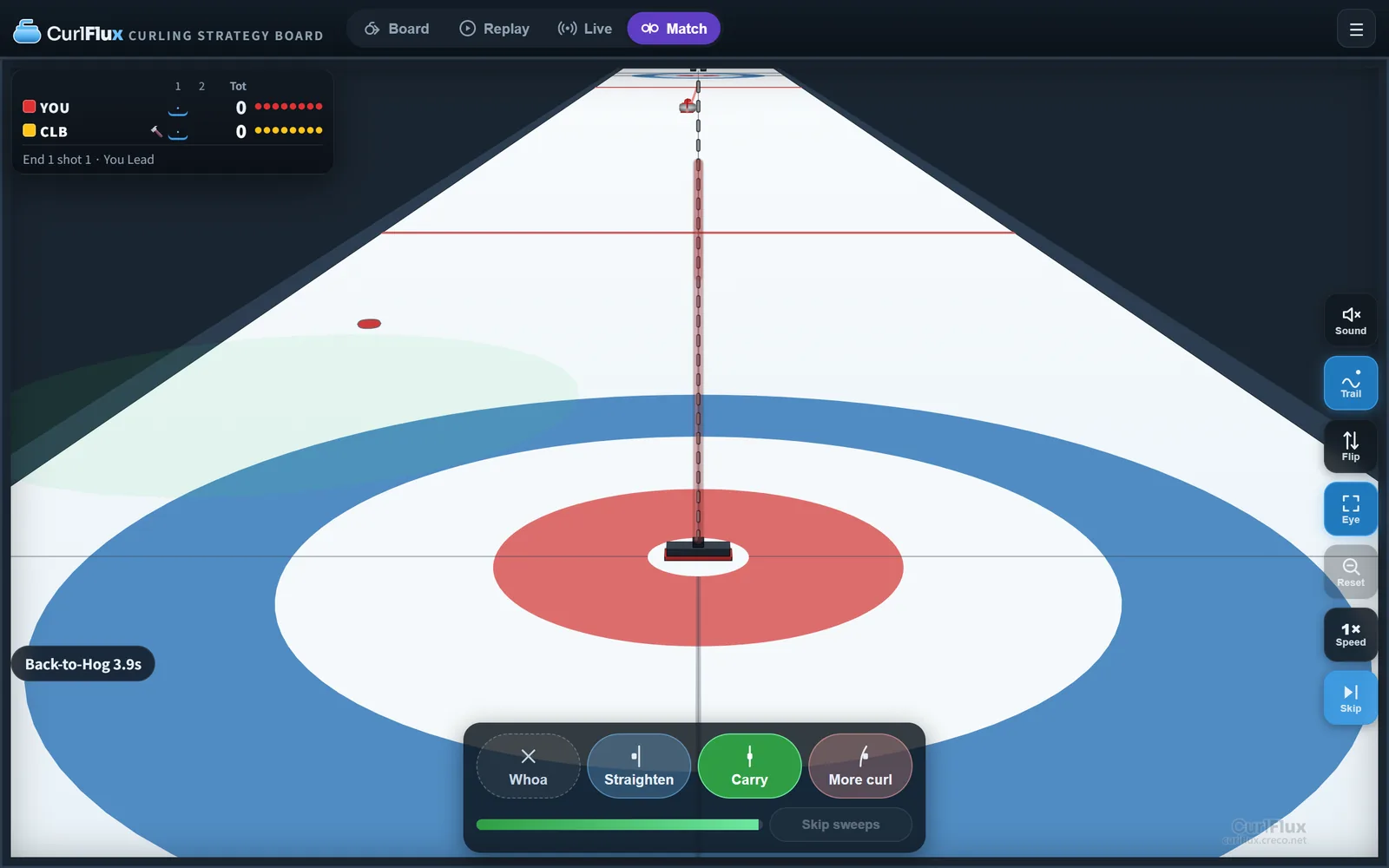
On the opponent's turn the only thing you can do is Skip sweeps. When their stone crosses the tee line into the house, you can sometimes sweep it out.
5. Ends and the end of the match
- After 16 stones the end closes itself and a ring of light from the tee counts the score
- Each time a stone stops, the caption shows the shot type and rating. At the end of an end you get steals, shot percentage and more
- After the last end the result appears (winner, line score, match statistics). Watch in Replay plays it stone by stone and Export as PCN saves the record as a file
- Conceding: Concede in the Match tab of the menu. The computer shakes hands when it has no way back
- Fouls: free guard zone (five-rock, no-tick) and hog line violations are called automatically; the throw is void
6. Assist level and settings
Found in the Match tab of the menu (☰ at the top right). The assist level only changes what the screen helps you with, never the physics or the opponent.
| Assist | Stop point | Prediction line | No.1 numbering |
|---|---|---|---|
| Easy | Exact stop point plus the reach circle | Show | Show |
| Average (default) | Reach circle only | Show | Show |
| Hard | Reach circle only | Hidden (ideal spot too) | Show |
| For real | Nothing: read the line and the hog-to-hog time | Hidden | Hidden |
On For real, the placement guide and placement marks are hidden too.
Open Details to set the three separately.
- Music: on/off in the Match tab. Volume is "BGM: volume" in the Settings tab
- The match is saved automatically; reloading the page continues it. Switching to the board or a replay does not lose it
7. Shortcuts (match)
| When | Key | Action |
|---|---|---|
| Before throwing | 1–6 | Weight tier (Guard to Peel) |
| Before throwing | Q / E | Turn (counter-clockwise / clockwise) |
| Before throwing | ↑ ↓ ← → | Move the broom |
| Before throwing | Enter | Throw |
| Before throwing | R | Watch that shot again |
| While running | 1 2 3 4 | Whoa / Straighten / Carry / More curl |
| While running | 5 | Skip sweeps (opponent's stone) |
| While running | Space | Add force with the current call |
| Any time | K | Fast-forward (the call stays on) |
| Any time | V / F | Switch view / flip |
| Any time | ? | List of shortcuts |
Frequently asked questions
Can I do anything on the opponent's turn?
Only Skip sweeps: once their stone crosses the tee line into the house you can sometimes sweep it out
My stones always stop short
Throws come out a little light on purpose. Once the stone is past the hog line, press Carry (Space) to carry it. The seconds under each tier give finer weights
I want it harder
Set the assist to For real and the opponent to Elite. Lowering your own level lowers both delivery accuracy and sweep power
Can two people play?
Set both teams to You and take turns on the same device
Is the match saved?
After the match, Watch in Replay or Export as PCN keeps it. Starting a new match discards the previous one
What happens when the shot clock runs out?
The stone is thrown with the settings at that moment